


Fire & Life Safety Line Types Bluebeam Tool Set
Fire & Life Safety Line Types Bluebeam Tool Set
Couldn't load pickup availability
Tool set of custom line styles for life safety plans, fire-rated wall plans, egress plans, and fire protection drawings. This tool set covers 2 categories with 238 tools, available in black and redline versions. Each of the 119 line styles comes as two tools: a line tool, a native Polyline markup that draws the style along any path you click, and a Length tool that draws the same line and measures its length. Bluebeam Revu draws the dashes, ticks, symbols, and lettering of each style along the path and around its corners. Every tool is named for what it draws and that name is also its subject, so placed markups list and count by name in the Markups List.
The two tool sets are General Drafting & Graphics and Fire & Life Safety. The General Drafting & Graphics set (45 line styles) is included with every Line Types tool set: dashed, center, hidden, and phantom lines, plan and phasing lines, borders, and graphic lines.
Examples of tools included:
-
General Drafting & Graphics (90 tools, 45 line styles)
- Dash, dash-dot, dash-dot-dot, center, hidden, and phantom lines in several dash lengths, with half-size center and hidden lines, long dash, double dash, and dashed lines
- Plan and phasing lines: match line, project limits, construction phasing, future work (FUTURE), abandoned in place (ABANDONED), existing to be removed (asterisks), removal (chain of X), and a cut line with scissors
- Borders and graphic lines: alternating solid border, double line with blocks, hollow and dashed rectangles, hatched edge, hash marks, heavy dash with cross ticks, wide dash band, scallop, wave, zigzag, spiral coil, braided rope, facing offset arcs, rings, large dots, stars, snowflake garland, footprints, pointing hand, path with arrows, and a hand-drawn line
-
Fire & Life Safety (148 tools, 74 line styles)
- Rated walls and barriers for 1 to 4 hours: rated walls lettered (1HR to 4HR) or with diamonds, fire barriers, fire walls, and fire partitions with lettering, fire-rated assemblies with slashes, rated partitions with dash-and-dot codes, fire and smoke assemblies with rings, and a fire partition with bars
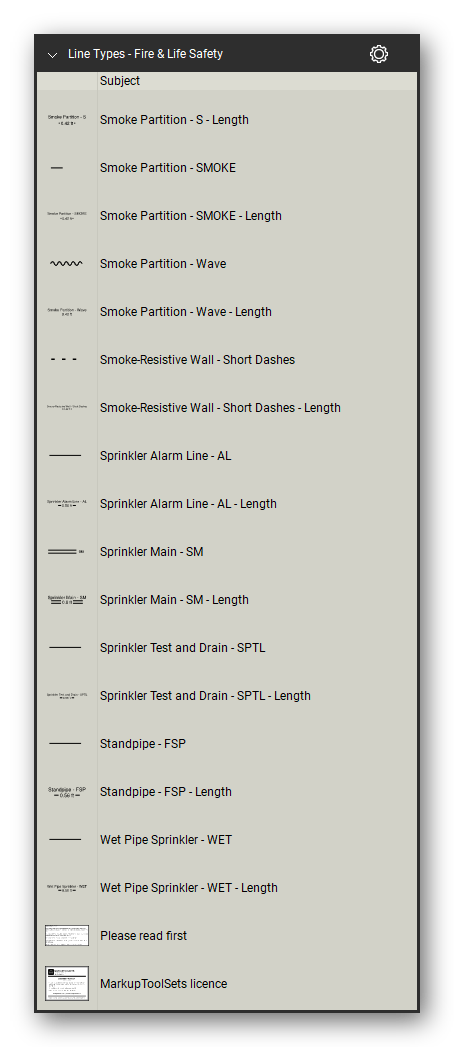
- Smoke: smoke barriers lettered (1HR-S to 4HR-S) or with diamonds, smoke partitions (S, SMOKE, RPS, wave, and hatched), smoke-resistive wall, smoke compartment boundary, and a heavy-dot smoke barrier
- Separations and egress: horizontal exit, occupancy separation, incidental use separation, area of refuge (AOR), health care suite boundary, egress path arrows, emergency egress, emergency access and egress, exit travel distance, fire lane access, and hose pull length
- Fire protection piping and wiring: wet, dry, preaction, and antifreeze sprinkler lines, sprinkler main, alarm line, test and drain, standpipe, fire main, fire department connection piping, fire pump test piping, fire protection drain, foam solution, high pressure fire water, and fire alarm wiring
Each line style is also included in a line style library for its tool set (two libraries), for any other markup.
Delivered as a Bluebeam Revu profile that loads both tool sets and their line styles in one import, plus the individual tool set and line style files, in black and redline.
How to use
- Import the profile (Revu > Profiles > Manage Profiles > Import, or double-click the .bpx file): one profile for black, one for redline. Or import single tool sets from the Tool Chest (Manage Tool Sets > Import).
- Line tools: click a tool, click from point to point along the run, and press Enter to finish.
- Ticks, arrows, symbols, and lettering follow the direction you draw: start from the other end to turn them over.
- Length tools: draw them like the line tools; they measure the length drawn.
Frequently asked questions
- Which version of Revu do I need? The tool sets were made and checked in Bluebeam Revu 21.
- What is the difference between a line tool and a Length tool? Both draw the same line style. The line tool places a Polyline markup; the Length tool places a Length measurement, so the length of the line it draws is measured.
- Can I change the color of a line? Yes. The line styles carry no color of their own: a placed line takes the color of its markup, which you set in the markup's properties like any other markup.
- Is the General Drafting & Graphics set in every Line Types tool set? Yes. Every Line Types tool set includes the same General Drafting & Graphics set of 45 line styles next to its trade sets.
- What is in the download? One zip file with both editions. Each edition has a profile (.bpx), the two tool set files (.btx), and the two line style libraries (.blx).


Let our customers speak for us
Let customers speak for us

It was extremely helpful in marking up a road closure and was needed by the city of New Haven to properly have sign placement as per their direction

We rely frequently on the section shapes for our steel detailing.

As someone who averages more than 4 hours a day on Bluebeam, these tools have been a life-saver!
