


Concrete & Masonry Hatch Patterns Bluebeam Tool Set
Concrete & Masonry Hatch Patterns Bluebeam Tool Set
Couldn't load pickup availability
Tool set of hatch patterns for wall sections, elevations, floor plans, details, and masonry and concrete takeoffs. This tool set covers 3 categories with 240 tools, available in black and redline versions. Each of the 120 hatch patterns comes as two tools: a hatch tool, a native Polygon markup filled with the pattern that you place and then stretch or reshape to fit the area, and an Area tool that draws the same hatched area as you click around it and measures it in square feet. Bluebeam Revu draws every pattern itself, so the hatches stay sharp at any zoom, and the line color, hatch color, and fill of a placed markup change in its properties like any other markup. Every tool is named for the hatch it draws and that name is also its subject, so placed markups list and count by name in the Markups List.
The three tool sets are Lines, Grids & Patterns, Concrete & Aggregate, and Brick, Block & Stone. The Lines, Grids & Patterns set (58 hatch patterns) is included with every hatch pattern tool set: ruled lines and cross-hatches, dashed and dash-dot lines, grids, dot screens and stipple, and geometric patterns.
Examples of tools included:
-
Lines, Grids & Patterns (116 tools, 58 hatch patterns)
- Ruled lines at 45 and 135 degrees, horizontal and vertical, from dense to wide spacing, and dense and extra-dense 45-degree cross-hatches
- Dashed, dash-dot, dash-double-dot, and dash-triple-dot lines with short, long, and double dashes
- Grids: square grids (1/16 in, 1/8 in, single and double line), rectangular grids, a 24 x 24 in ceiling grid, and a 60-degree triangular grid
- Dots and stipple: 10, 20, and 30 percent dot screens, square, staggered, and triangular dot grids, and dense and light stipple
- Patterns: basketweave, herringbone lines, honeycomb and hexagons, houndstooth, square and diagonal plaid, plus signs, stair-step lines, small squares, inverted triangles, woven triangles, and cylinder shading
-
Concrete & Aggregate (44 tools, 22 hatch patterns)
- Concrete: stipple and flecks, sparse, large, and coarse aggregate, dense stipple and aggregate, triangles and dots, 45-degree lines and dots, reinforced concrete with bars, precast concrete, and concrete topping
- Gravel: pea gravel, packed medium stones, large loose stones, coarse angular, crushed stone, and sparse flecks
- Sand (fine, dense, and sparse stipple), plaster, gypsum board, and asphalt paving in section
-
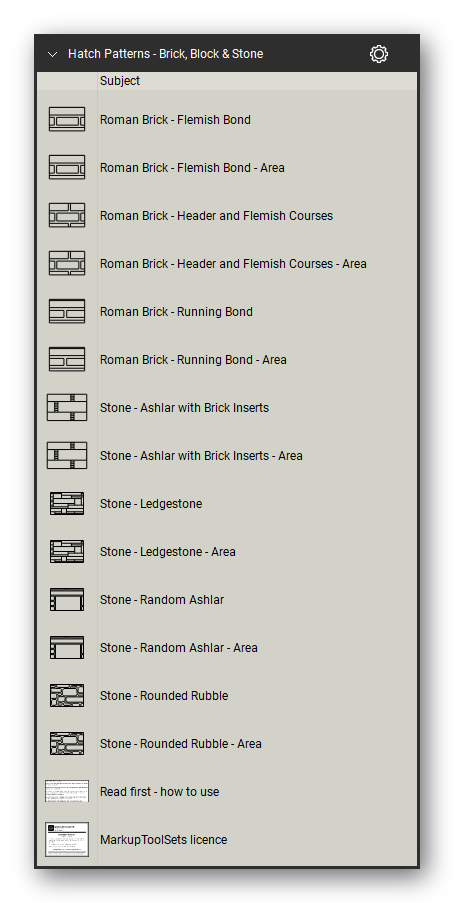
Brick, Block & Stone (80 tools, 40 hatch patterns)
- Brick bonds: running bond (plain, small, short and long units, mortar joints, rustic, diagonal, and single line), 1/3 running bond, stack, common, English, Flemish (also with a diamond pattern), Flemish garden wall, Flemish stretcher bond with accents, monk bond, and 45-degree herringbone
- Roman brick in running bond, in Flemish bond, and in header and Flemish courses
- Concrete block: CMU 8x8, 8x16, 8x20, and 8x24 in running bond, with mortar joints, wide joints, and small and large units; CMU in section (bearing wall, dense and wide cross-hatch)
- Brick in section (45-degree lines, solid and dashed lines), firebrick, and stone: random ashlar, ledgestone, ashlar with brick inserts, and rounded rubble
Each hatch pattern is also included in a hatch pattern library for its tool set (three libraries), so the patterns appear in Revu's hatch pattern list for any closed markup.
Delivered as a Bluebeam Revu profile that loads all three tool sets and their hatch patterns in one import, plus the individual tool set and hatch pattern files, in black and redline.
How to use
- Import the profile (Revu > Profiles > Manage Profiles > Import, or double-click the .bpx file): one profile for black, one for redline. Or import single tool sets from the Tool Chest (Manage Tool Sets > Import).
- Hatch tools: click a tool, then click the sheet to place the hatched sample; drag its handles to stretch it or its corner points to reshape it.
- Area tools: click a tool, click around the area corner by corner, and finish on the first corner; the area drawn is measured.
- Any closed markup: pick one of the patterns from the hatch pattern list in the markup's properties.
Frequently asked questions
- Which version of Revu do I need? The tool sets were made and checked in Bluebeam Revu 21.
- What is the difference between a hatch tool and an Area tool? Both draw the same hatch. The hatch tool places a hatched Polygon markup that you stretch or reshape; the Area tool draws an Area measurement around the corners you click, so the size of the hatched area is measured in square feet.
- Does the Area tool show its area on the sheet? Its caption is off when it is placed, so only the hatch shows on the sheet. The caption holds the hatch name: switch it on in the markup's properties to show the name and the area.
- Can I change the color of a hatch? Yes. Each tool comes in black or red; a placed hatch's color is set in its properties like any other markup.
- Is the Lines, Grids & Patterns set in every hatch pattern tool set? Yes. Every hatch pattern tool set includes the same Lines, Grids & Patterns set of 58 hatch patterns next to its trade sets, and the Complete Hatch Patterns tool set holds all eight sets.
- What is in the download? Two zip files, one for each edition (black and redline). Each holds a profile (.bpx), the three tool set files (.btx), and the three hatch pattern libraries (.bhx).


Let our customers speak for us
Let customers speak for us

It was extremely helpful in marking up a road closure and was needed by the city of New Haven to properly have sign placement as per their direction

We rely frequently on the section shapes for our steel detailing.

As someone who averages more than 4 hours a day on Bluebeam, these tools have been a life-saver!
